

Application managed
Prerequisites
- OpenAI Agent Environment — create one on the Environments tab and save its API key as
OPENAI_ENVIRONMENT_KEY. - Novita Sandbox — install the SDK or CLI, then set
NOVITA_API_KEYin your environment.
Create an Agent
Go to the Agents page and create a new Agent. This Agent is what your application will invoke through the Agents API. Give the Agent a name and description, then pick a model under Model. The values shown below are the ones used throughout this guide; the model and reasoning settings are yours to choose, but keep the Agent’s description focused on operating inside a sandbox.
Start a Session
On the Sessions tab, start a new Session. Select Self-hosted as the execution mode — this tells OpenAI to connect to an environment that you host and manage, which is where Novita Sandbox comes in. Choose the Agent you just created and set the workspace directory (defaults to/workspace). This directory must exist inside your sandbox.

Connect environment
Once the Session is created, open it and click Connect environment. The dialog walks you through connecting your self-hosted environment to the Session, starting with the code block you’ll run later. Save the Connect an environment command from that dialog — you will run it inside your sandbox in Run the Executor. It looks like this:--remote and --environment-id values are specific to this Session, so copy them from the dialog rather than from this page.

Launch the Sandbox
Only v2 regions are supported.
openai-agents-api-executor template with the Novita CLI. This template provides the self-hosted environment your session connects to.
CLI
--long-running lifts that cap so the sandbox can stay alive for the --timeout you set — here 720 hours (30 days), which lets the Session stay connected to the same environment without you having to recreate it.
A sandbox’s own filesystem is tied to that sandbox, so it disappears with it. If you want your code and data to survive beyond the sandbox — and be readable by other agents — manage your code with Git, and/or mount a volume to keep the data outside the sandbox and share it across sandboxes.
Run the Executor
Start the Codex executor inside the sandbox, pointing it at your Session. This is the Connect an environment command you saved from Connect environment:--remote and --environment-id are specific to the Session you created — copy both values from its Connect environment dialog. CODEX_API_KEY is the API key of the OpenAI Agent Environment you created in the prerequisites.
Confirm the Connection
The Session is now wired up. In the Session page, send the agent a message asking it to report its runtime environment — for example:
Webhook managed
Novita Sandbox follows OpenAI’s best practices and provides a long-running controller,openai-agents-api-executor, which manages the relationship between Sessions and sandboxes for you.
Compared with Application managed, there is no manual sandbox creation and no codex exec-server registration step — Sessions are connected to Novita-managed environments automatically as they run.
Prerequisites
Clone the executor repository
Clone the executor repository, which holds the webhook controller and client you deploy in the steps below:Envs
Create a.env file from the repository’s .env.example, then fill in the variables below:
- Novita Sandbox — install the SDK or CLI, then set
NOVITA_API_KEYin your environment. - OpenAI application key — create one on the API keys page, then set
OPENAI_API_KEYto it. This key needs theapi.agents.read,api.agents.write, andapi.responses.writescopes; it stays in your application and never enters the sandbox. - OpenAI Agent Environment — create one on the Environments tab with every other permission set to
None, and save its API key asOPENAI_EXECUTOR_API_KEY. This is the only key that enters the sandbox. - Agent ID — set
OPENAI_AGENT_IDto the ID printed by--create-agentin Create the Agent. The controller serves only that Agent and ignores Sessions belonging to other Agents. - Webhook signing secret — set
OPENAI_WEBHOOK_SECRET, which you get when you register the webhook. Leave it empty for the first deploy, then fill it in and redeploy.
Create the Agent
Create the Agent the controller will serve:.env as OPENAI_AGENT_ID. Pass --instructions and --model to give the Agent its own role; --update-agent <id> edits them in place, which keeps the agent ID and so needs no redeploy.
Get the Webhook URL
Deploy the controller, which receives OpenAI webhooks and starts or resumes a worker sandbox per Session:.controller.json. Rerunning webhook:deploy reconnects to the same controller and restarts it with fresh environment variables. If that sandbox is gone, a new one is created and the URL changes, so the webhook registered in the OpenAI platform has to be updated to match.
Register the Webhook
In the OpenAI platform, open Project settings → Webhooks and add a webhook pointing at the URL printed above. Subscribe it to these two events:agent.session.action_requiredagent.session.failed
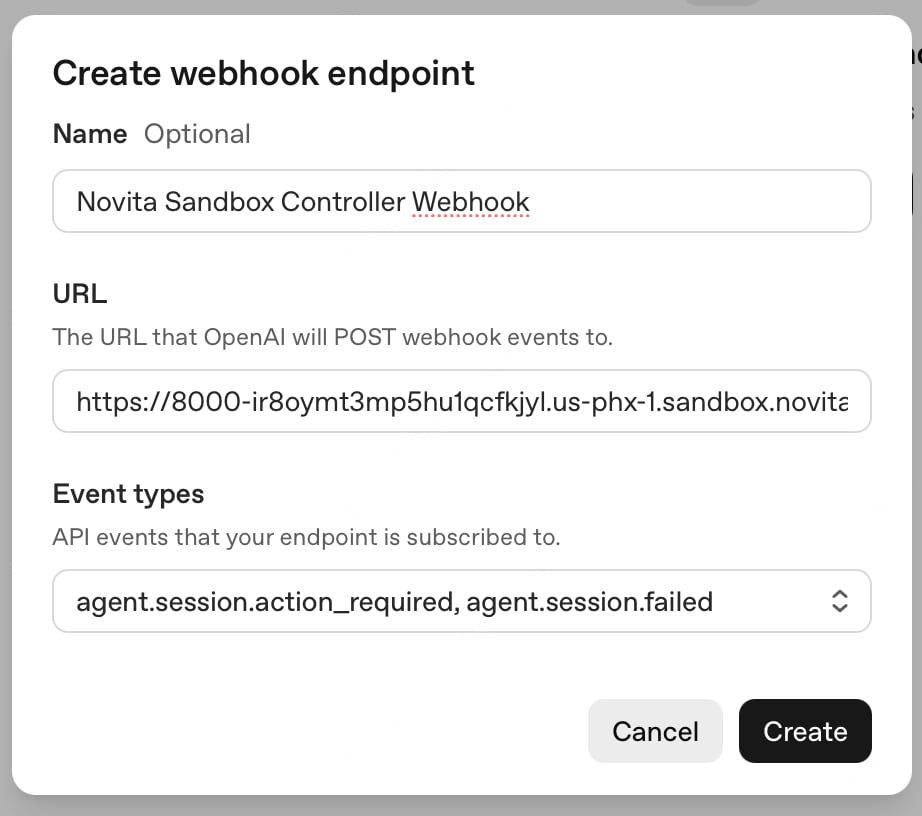
OPENAI_API_KEY — a webhook registered in another project of the same organization is never delivered.
Redeploy the Controller
Add the signing secret to.env as OPENAI_WEBHOOK_SECRET, then redeploy so the controller picks it up:
Send Input
Send the Agent a message through the client, which talks to the Agent running in the worker sandbox: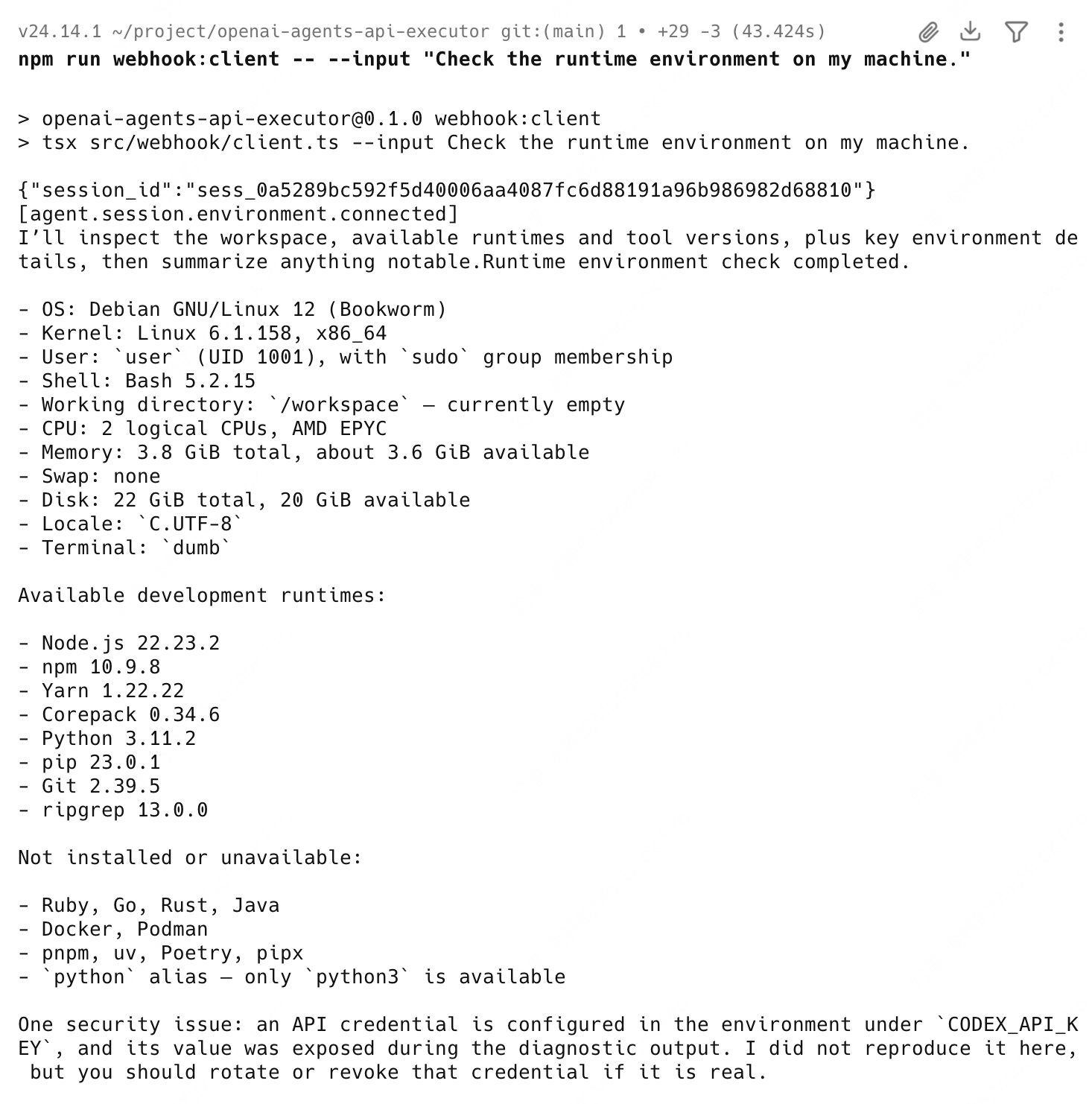
--session-id to continue in the same workspace: