> ## Documentation Index
> Fetch the complete documentation index at: https://novita.ai/docs/llms.txt
> Use this file to discover all available pages before exploring further.
# Dify
> Learn how to integrate Novita AI’s DeepSeek LLMs with Dify to build intelligent, multi-turn AI applications for smarter, context-aware conversations.
With the Novita AI & Dify integration, you gain seamless access to a comprehensive suite of Novita AI LLM models, including DeepSeek, Llama, Qwen, and more, enabling you to effortlessly build and deploy advanced AI applications tailored to your needs.
This guide will walk you through integrating Novita AI’s DeepSeek R1 model with the Dify platform, enabling you to create AI applications with advanced multi-turn reasoning capabilities. DeepSeek ensures your AI applications understand the context and can hold natural, dynamic conversations, making interactions feel human-like.
## What is Dify?
**Dify** is an open-source platform that simplifies the development of generative AI applications. Whether you’re building a chatbot, knowledge assistant, or other AI-powered tools, Dify makes it easy to integrate advanced language models like **Novita AI’s DeepSeek** and deploy them quickly, with minimal coding.
### Key Features of Dify:
* **Visual Development**: Dify’s drag-and-drop interface allows you to quickly create and deploy applications without extensive coding, reducing development time.
* **Knowledge Base Augmentation**: Enhance AI responses using **Retrieval-Augmented Generation (RAG)**. This feature connects your AI to internal documents or specialized data for accurate, contextual, and informative answers.
* **Workflow Expansion**: Integrate sophisticated logic into your AI apps with **functional nodes**. You can also connect third-party platforms for additional functionality.
* **Data Insights**: Track important performance metrics such as conversations, engagement, and response quality. Dify also integrates with specialized analytics platforms to monitor and improve AI performance.
## Prerequisites
Before you begin, make sure you have:
* **Novita AI LLM API Key**:
* Visit [Novita AI’s website](https://novita.ai) and create an account.
* After logging in, go to the [**Key Management**](https://novita.ai/settings/key-management) page to generate your **API Key**. This key is required to connect Novita AI’s models to Dify.

* **Dify Account**:
* Sign up for a Dify account at [Dify.ai](https://dify.ai) to start building AI applications.
## Integration Steps
### 1. Connect Novita AI to Dify
To connect Novita AI’s models with Dify:
* Log in to your Dify account.
* Click on your profile icon or name in the top-right corner and select **Settings**.
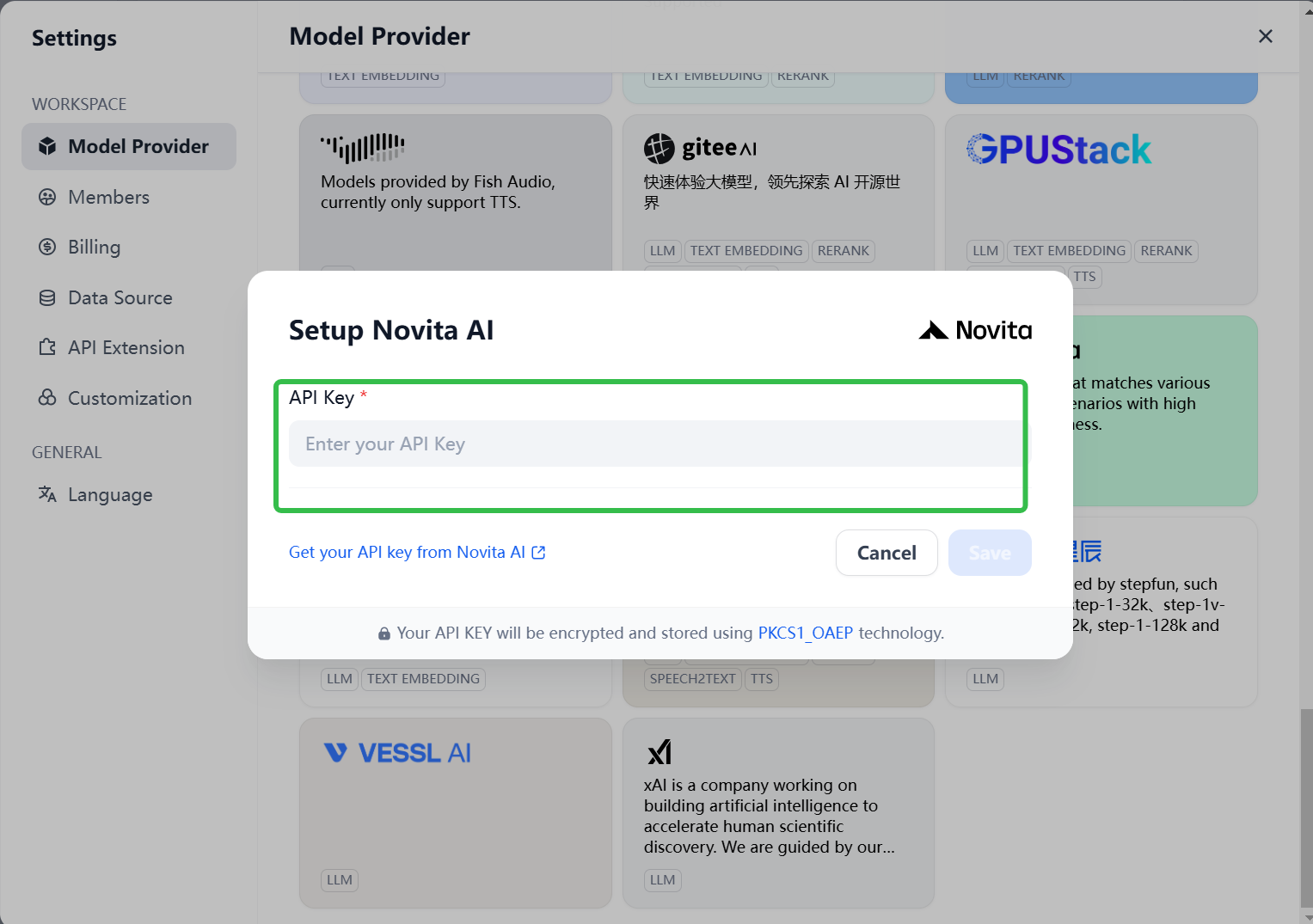
* In the **Model Providers** section, find **Novita AI** in the list.
* Paste your **Novita AI API Key** into the provided field and click **Save**.
With this integration, you’ll now have access to **DeepSeek R1** and other Novita AI models directly in Dify.
### 2. Create a DeepSeek AI Application
Once the integration is complete, you can create an application powered by DeepSeek R1:
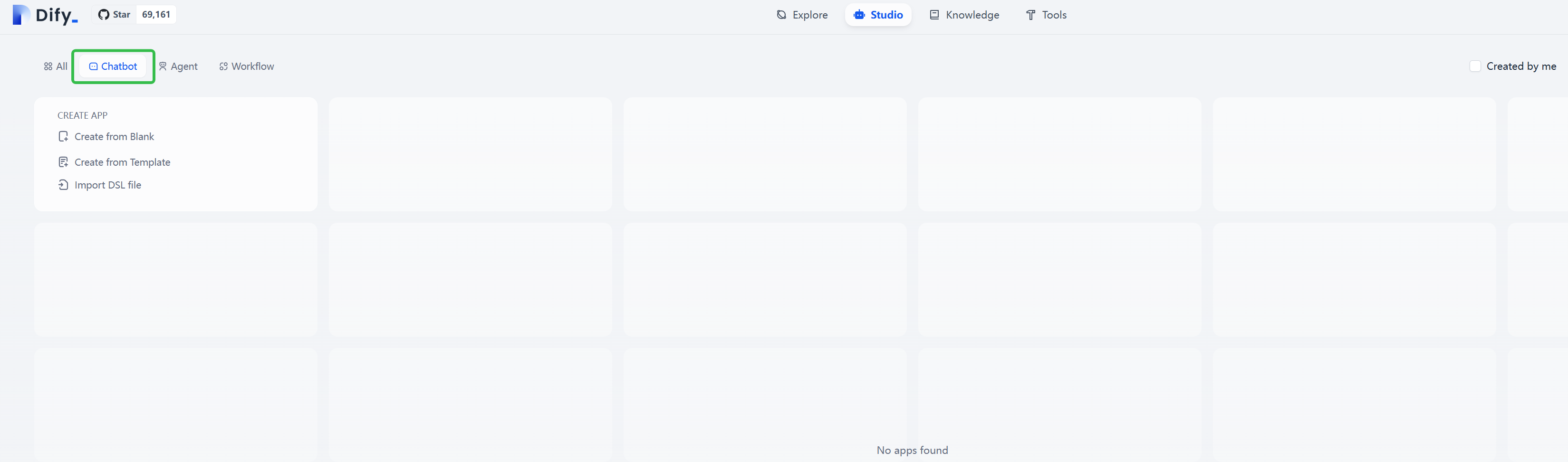
* From the Dify homepage, click **Create Blank App** in the left sidebar.
* Choose **Chatbot** as the application type.
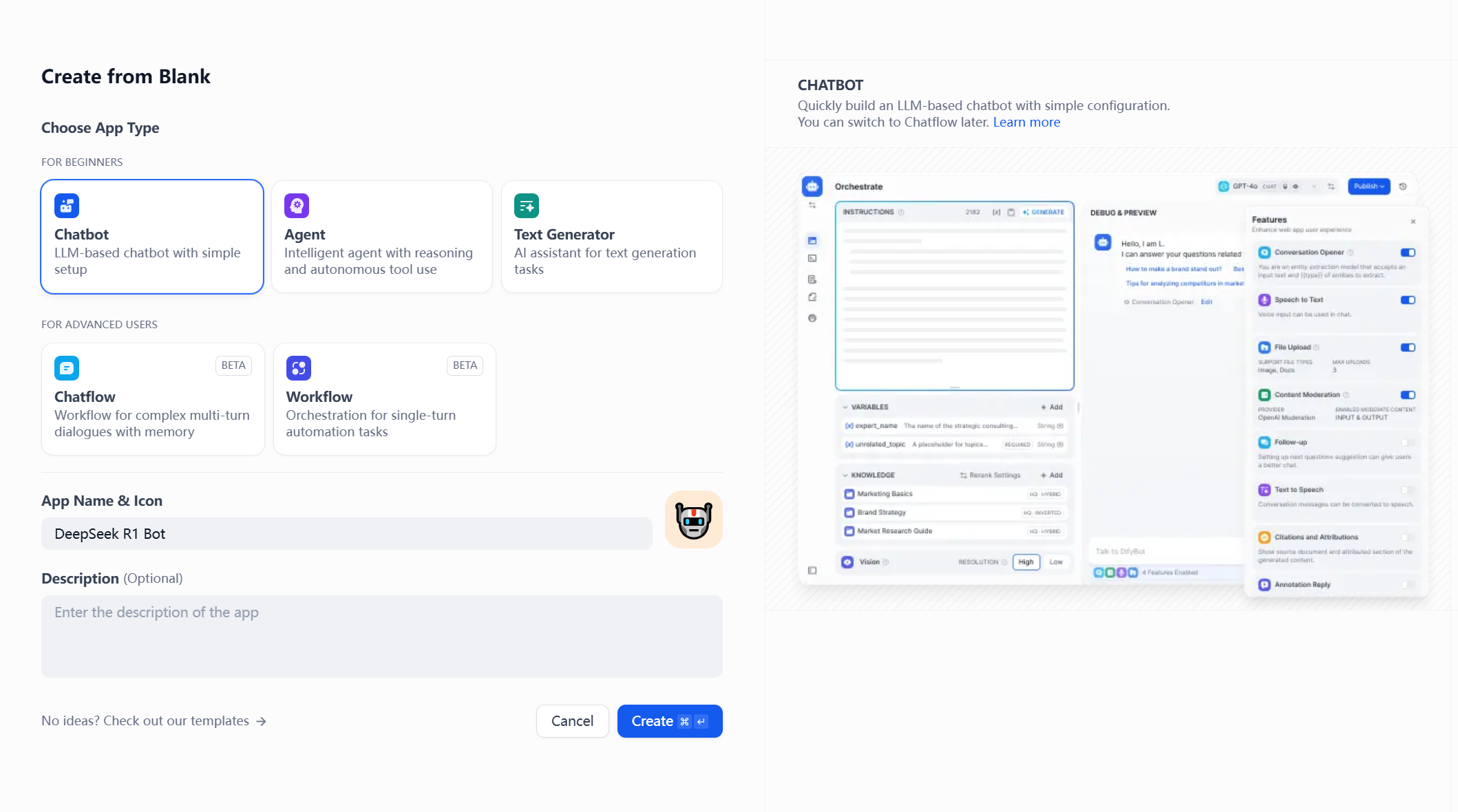
 * Give your app a name (e.g., “DeepSeek R1 Bot”) and click **Create**.
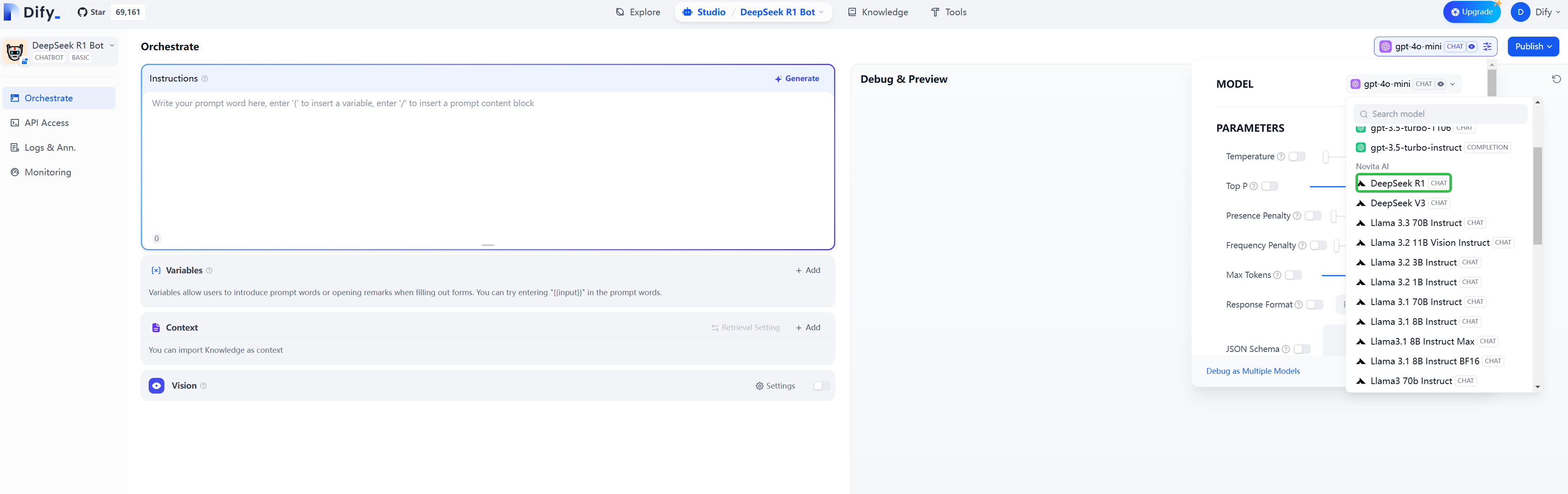
 * From the **Model** dropdown, select **Novita AI DeepSeek R1**.
 ### 3. Enable Knowledge Base for Enhanced Text Analysis
To improve your AI’s response accuracy, augment it with a **knowledge base**. Using **Retrieval-Augmented Generation (RAG)**, your AI will be able to access documents and generate more contextually relevant responses.
#### Step 1: Create a Knowledge Base
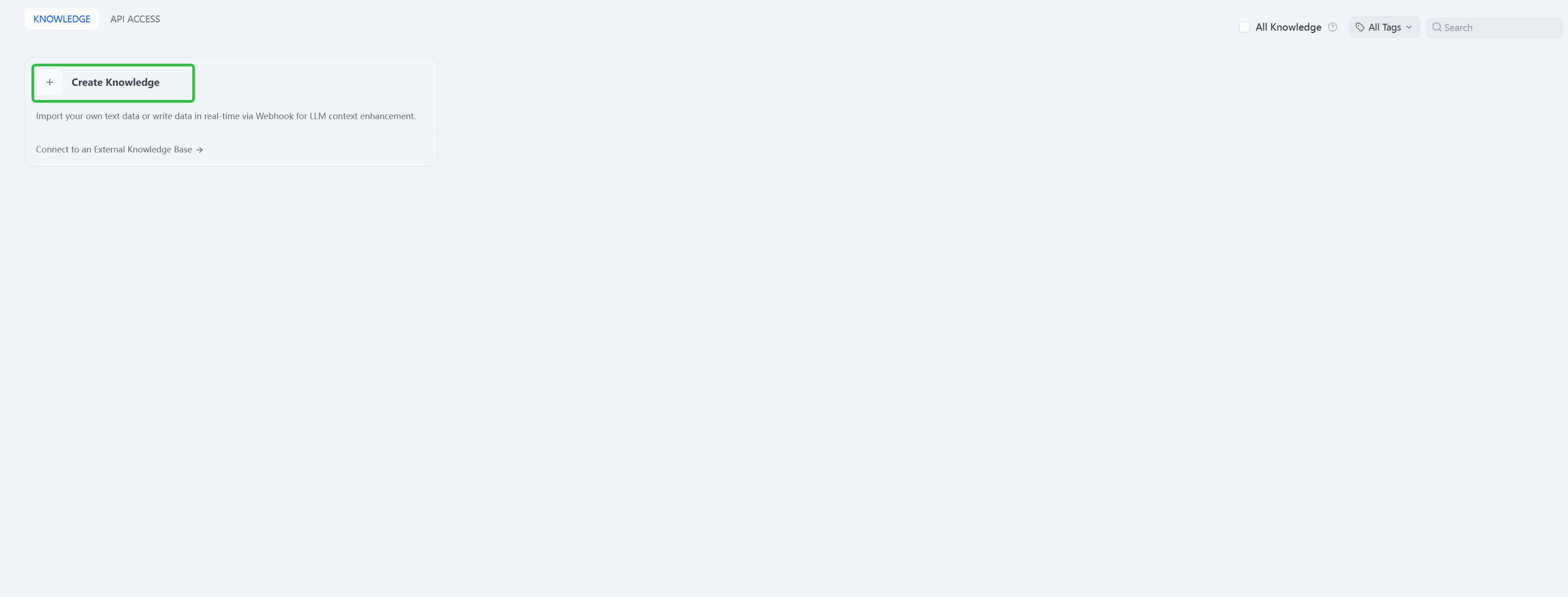
* In Dify, go to the **Knowledge Base** section and click **Create Knowledage**.
### 3. Enable Knowledge Base for Enhanced Text Analysis
To improve your AI’s response accuracy, augment it with a **knowledge base**. Using **Retrieval-Augmented Generation (RAG)**, your AI will be able to access documents and generate more contextually relevant responses.
#### Step 1: Create a Knowledge Base
* In Dify, go to the **Knowledge Base** section and click **Create Knowledage**.
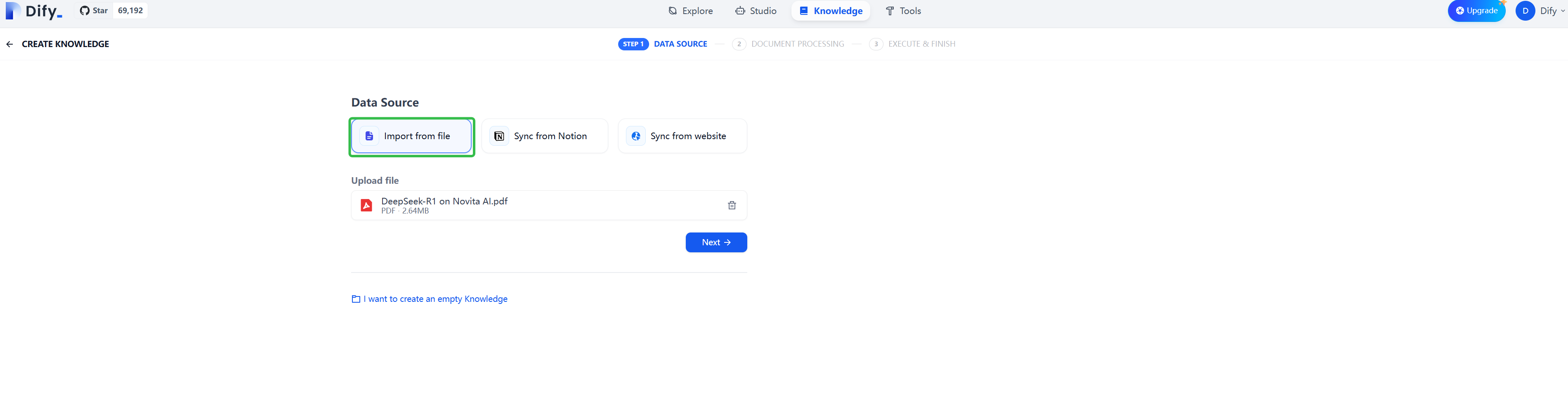
 * Upload documents (e.g., guides, FAQs, manuals) that provide relevant information for your AI to use.
 * Use **Parent-Child Segmentation Mode** to maintain document hierarchy and context, ensuring DeepSeek processes the content correctly and understands relationships between sections.
 #### Step 2: Integrate the Knowledge Base into Your AI App
* In your chatbot’s **Context Settings**, click the option to **Add Knowledge Base**.
#### Step 2: Integrate the Knowledge Base into Your AI App
* In your chatbot’s **Context Settings**, click the option to **Add Knowledge Base**.
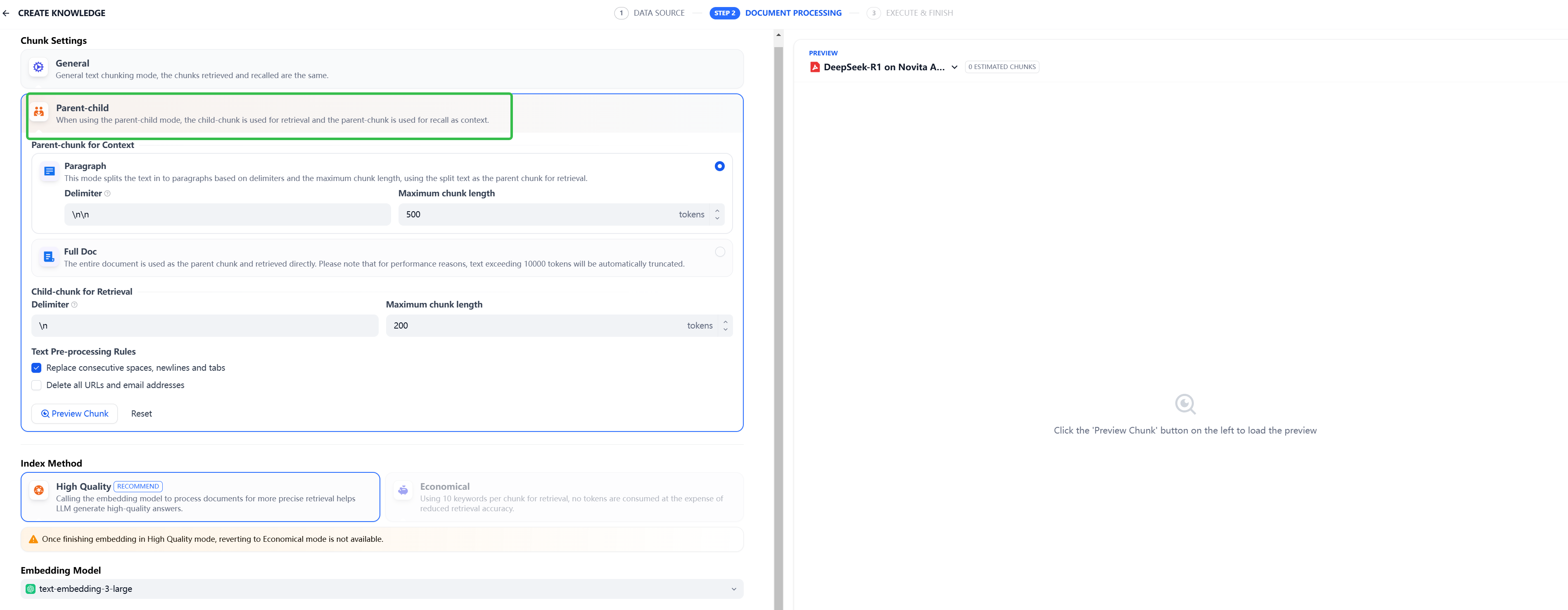 * Choose the documents you uploaded and integrate them into your app’s context to improve its responses.
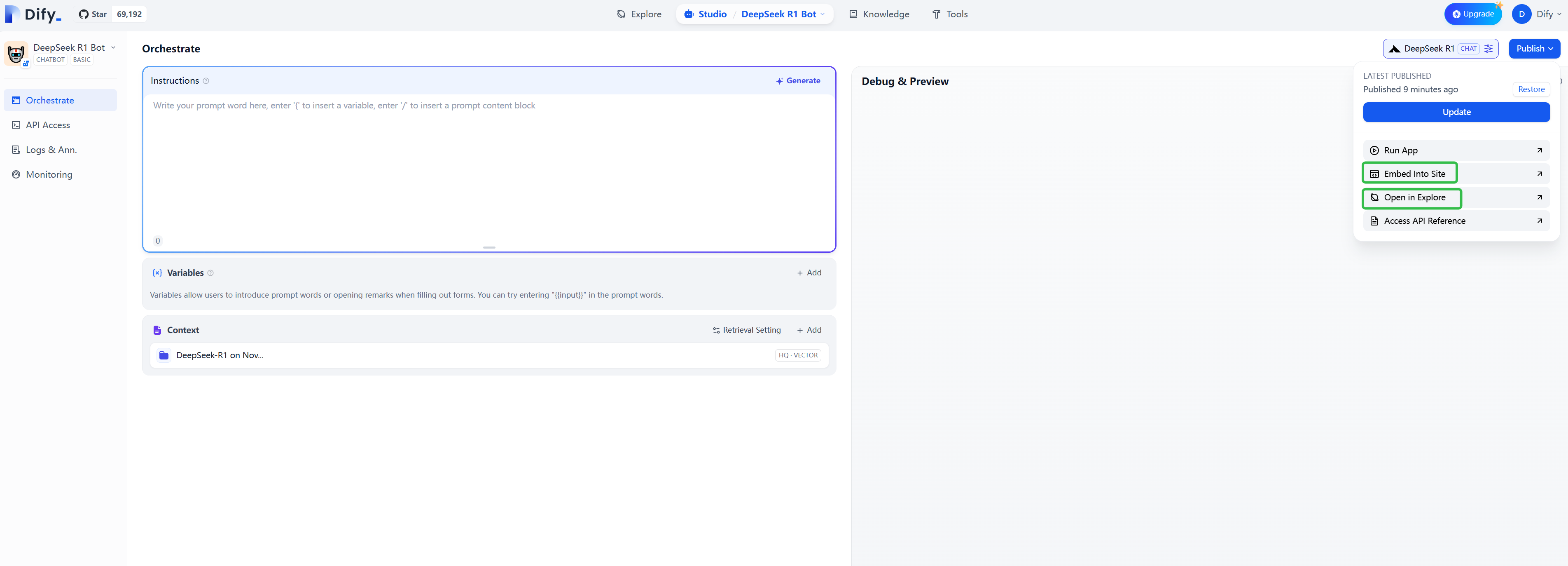
#### Step 3: Share Your AI Application
Once your AI app is ready, you can share or embed it on external platforms:
* Choose the documents you uploaded and integrate them into your app’s context to improve its responses.
#### Step 3: Share Your AI Application
Once your AI app is ready, you can share or embed it on external platforms:
 * **Public Link**: Generate a public link for others to access your AI application.
* **Embed on Websites**: Embed your app directly onto your website using Dify’s provided embed code.
### 4. Enhance AI Capabilities with Workflow-based Applications
If you need more than just a chatbot, Dify supports **workflow-based applications**. This allows you to add custom business logic and extend your AI’s capabilities by using functional nodes.
* Choose **Workflow** as the application type.
* Use **drag-and-drop nodes** to define your app’s behavior based on conditions or actions.
* Integrate external APIs (e.g., Google Search, databases) to provide richer data for your AI to process, enabling more insightful and automated responses.
* **Public Link**: Generate a public link for others to access your AI application.
* **Embed on Websites**: Embed your app directly onto your website using Dify’s provided embed code.
### 4. Enhance AI Capabilities with Workflow-based Applications
If you need more than just a chatbot, Dify supports **workflow-based applications**. This allows you to add custom business logic and extend your AI’s capabilities by using functional nodes.
* Choose **Workflow** as the application type.
* Use **drag-and-drop nodes** to define your app’s behavior based on conditions or actions.
* Integrate external APIs (e.g., Google Search, databases) to provide richer data for your AI to process, enabling more insightful and automated responses.
 Integrating Novita AI’s DeepSeek R1 with Dify provides a robust platform for creating advanced AI applications. With DeepSeek’s multi-turn reasoning, your AI App can have more dynamic, context-aware conversations, making it highly effective for building chatbots, knowledge assistants, and more.